Dynamic variables
Tracking in FraudFilter gives you visibility and statistics on campaign performance, either as a replacement or compliment to additional 3rd party tracking.
Uses:
- Track conversions for landing pages
- Track conversions per placement or publisher
- Identify fraudulent traffic (safe page visit rate) for placements and publishers
Dynamic variables are simple but they might be difficult to understand for a user who has never used templates.
90% of our customers do not need this. Why? because most of our customers use third party trackers like Voluum.
If you want to integrate a tracker like Voluum then you can use*theAppend URL Query*option as described here: https://docs.fraudfilter.io/kb/tracking/
Example Setup
Let's say your cloaked URL is http://cloakedURL.com/campaign400?age=40&interest=marketing
And your money page URL from the tracker is http://moneypageURL.com?c1=40&c2=marketing
As you can see the bold part (URL query parameter name) differs in both the URLs, so if we use URL Query Append option then
http://cloakedURL.com/campaign400?age=40&interest=marketing will send traffic to http://moneypageURL.com?age=40&interest=marketing
Why? because the URL query appends everything after ? from the cloaked URL at the end of the money page URL.
If you want to manually pass values to different variable names then you must use Dynamic variables.
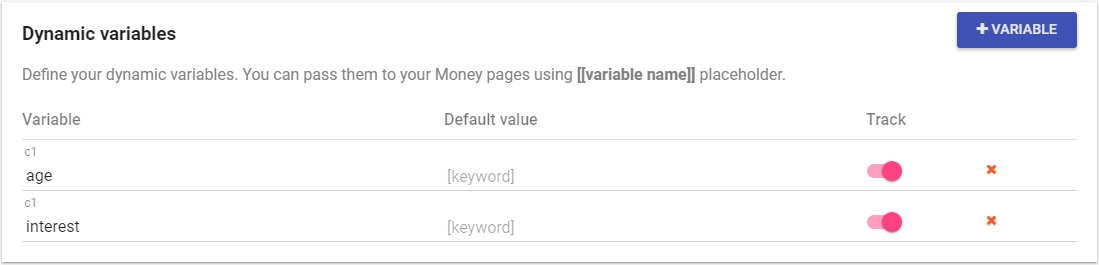
This configuration will capture the value of age and interest parameter names.
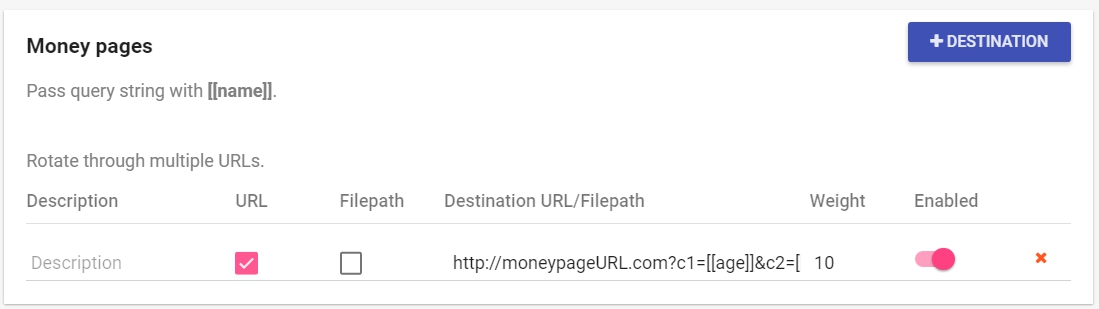
Then we can simply pass them to money page URL using this format [[name]]
So, the money page URL becomes: http://moneypageURL.com?c1=[[age]]&c2=[[interest]]
The default value is passed when there is no value for these parameters in the cloaked URL.
Once you enable the DV tracking, you need to update your code again:
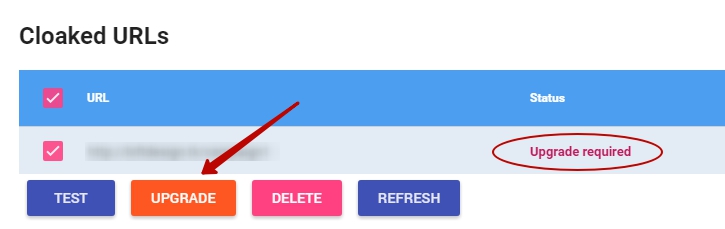
That’s all, now you’ll be able to track your campaigns. You will see your results in Trackingsection of Stats.