Issues
404 error on WordPress code save
By default, WP plugin will replace the php open and close tags.
But in some rare cases, it will fail - we don't know the reason.
In this case, you can manually remove **** from the top and bottom of the advance code.
It happens because the shared or managed hosting environments filter the code which you are trying to save and reject such POST requests. It has to do with the security configuration set by your hosting provider.
If the above-mentioned steps do not solve your issue then please consider reading the first warning here: https://docs.fraudfilter.io/kb/wordpress/
Inaccurate Google Analytics
Google Analytics only tracks the visitors who have JavaScript enabled. Some privacy browser add-ons might completely block Google Analytics and make your tracking inaccurate.
AdBlock and Privacy Addons
Browser add-ons like Adblock and other privacy add-ons block tracking scripts and impression counters. So, you might not see those visitors in your tracking tools.
Extensions like AdBlock Plus, NoScript, and Ghostery might block Google Analytics and similar products.
See: https://pagefair.com/blog/2017/adblockreport/
Different GEO data
The GEO info like country, ISP etc.. you see is from GEO data providers. This data is derived from the IP of the visitor and might be different in different services as they all use different GEO databases. FraudFilter's GEO data might differ from the one your tracker uses. For example, FraudFilter might say that the visitor is from the UK but your tracker might display the visitor's location as the US.
Redirect loop
Why changing state results in redirect loop?
Redirect loop occurs when you are redirecting from one location to the same location.
If you’ve set the status to “allow all”, it should redirect to the money page.
If you’ve set status to “block all”, it should redirect to the safe page
Now, if you’ve uploaded code to www.domain.com/folder and your money page URL is also www.domain.com/folder, on setting campaign state to “allow all”, the location of code: www.domain.com/folder will redirect to the location of money page, resulting in the redirect loop.
The location of code must be different. It can’t be same as money page URL or safe page URL.
The solution is to simply change the location of money page to something other than the location of the code.
If you are using PageGuard, please read the last warning.
Blank page
After implementing the code, it doesn’t work. It results in a blank page.
This happens when:
- You are not using our recommended setup: https://docs.fraudfilter.io/kb/recommended-hosting-setup/ (missing modules, obsolete PHP extensions, non-standard configuration etc...)
- The page which you are including can't be included because of openbasedir directory restriction or permission issue or page's PHP code has errors, warnings, notices and displaying: errors, warnings, notices is disabled, which results in the blank page.
- You are not saving PHP file with UTF-8 encoding or leaving whitespace in the beginning of the file. Below is the screenshot from Sublime Text, you can Google to how to save file using UTF-8 encoding in the text editor you are using.
Please add these lines to index.php
after the next line
add:
ini_set('display_startup_errors',1);
ini_set('display_errors',1);
error_reporting(-1);
Curl Error Code 6
If you are getting this error, it means the DNS resolvers on your host are faulty. It's a problem with your host, not us. Please ask them to fix the DNS resolvers of your server.
CURLE_COULDNT_RESOLVE_HOST (6) Couldn't resolve host. The given remote host was not resolved.Sometimes a reboot/power cycle/restart might solve your issue.
500 internal server error
This mostly occurs on managed hosting providers like HostGator or Godaddy when the user sets incorrect permission on file instead of the folder as instructed in our guide. We always recommend against using these traditional hosting providers.
Please set your permissions according to this guide to fix this issue.
If this doesn't solve your issue then ask your hosting provider to solve this 500 internal server error on your web server (provide them with URL which displays 500 error) and if they provide you with any specific reason for this error, please provide that reason to our support team.
If you are not using our recommend setup then we suggest asking your hosting provider to check apache error logs and identify the root cause, please report these errors to our support team.
It's your local server issue, only your hosting provider will be able to resolve it for you.
If all the above steps fail, then we recommend you use our recommend setup: http://docs.fraudfilter.io/kb/recommended-hosting-setup/
If you are using our recommended setup, here is ServerPilot's guide on how to fix 500 internal server errors: https://serverpilot.io/community/articles/fix-500-internal-server-error.html
Private IP
Your server is sending us private IP address and not the real visitor IP address
Basically, it means your server is offering us local network IP when being asked for $_SERVER["REMOTE_ADDR"] in PHP.
You need to fix your server configuration to make it return correct visitor IP.
Alternatively, you can use our recommend setup: https://docs.fraudfilter.io/kb/recommended-hosting-setup/
Real Visitor IP on CDN
It will work as long as you setup your web server to pass us the correct IP.
This guide is for Cloudflare CDN but your CDN might have a similar guide to restore the actual visitor's IP on the web server.
Cached Page
In logs, it stays "redirected to money page" but when you refresh the page, you are still being sent to the safe page.
This is due to the local cache of your browser.
Here is the proper way to test your setup.
SSL_ERROR
We recommend this setup: https://docs.fraudfilter.io/kb/recommended-hosting-setup/
Usually, we don't offer support for other hosting environments.
The problem is in your certificate/configuration on the server and there is a warning producing during the handshake. Most browsers ignore such SSL handshake warning.
The best solution is to fix your apache configuration.
You can use this online check for certificate errors,https://www.sslshopper.com/ssl-checker.html
"Unrecognized_name" SSLProtocolException will occur only if above yellow marked properties (ServerName and ServerAlias) will not be set in your apache configuration. The name given for these properties must match the CN value in the certificate.
Here are the instructions:
NameVirtualHost :443 NameVirtualHost :80
ServerAdmin email address here ServerName mydomain.net ServerAlias mydomain.net DocumentRoot /srv/www/mydomain.net/public_html/ ErrorLog /srv/www/mydomain.net/logs/error.log CustomLog /srv/www/mydomain.net/logs/access.log combined
ServerAdmin email address here ServerName mydomain.net ServerAlias mydomain.net DocumentRoot /srv/www/mydomain.net/public_html/
ErrorLog /srv/www/mydomain.net/logs/error.log CustomLog /srv/www/mydomain.net/logs/access.log combined SSLEngine on SSLOptions +StrictRequire SSLCertificateFile /etc/ssl/certs/server.crt SSLCertificateKeyFile /etc/ssl/private/server.keyNOT_FOUND_404
The page which you are trying to test does not exist. If you've recently changed the DNS - it's possible that it has not been propagated yet.
Go to https://www.whatsmydns.net and see if it displays your web server IP when you enter its domain. If it shows some other IP then your DNS records are not yet propagated.
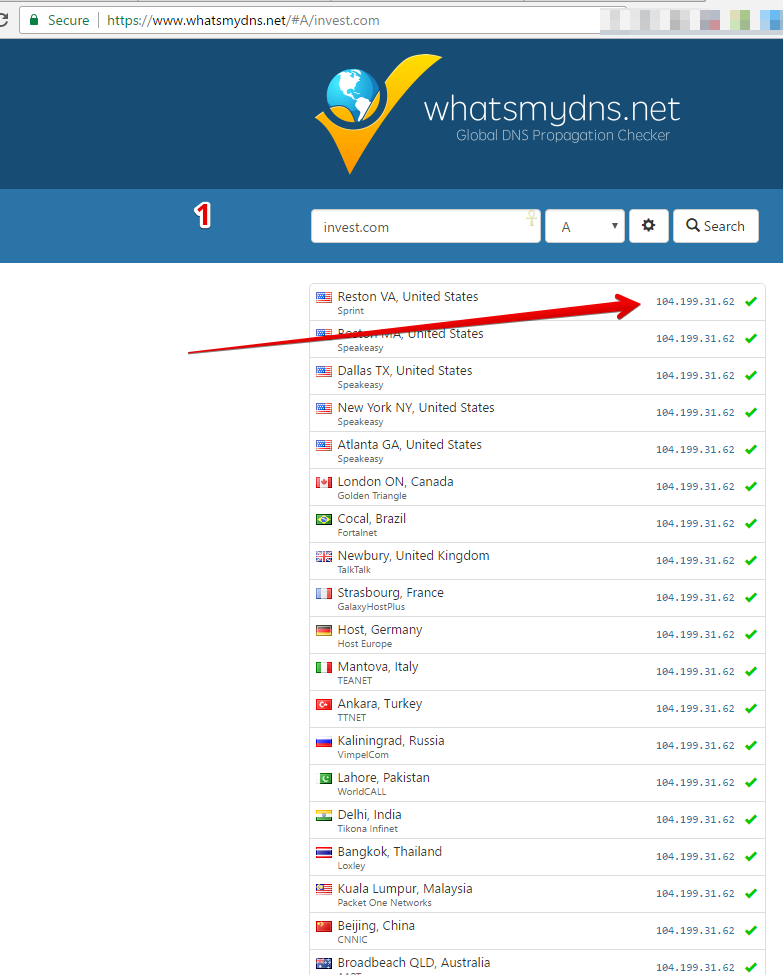
Here is the complete guide on a proper domain, DNS and hosting setup.
INVALID_URL
You are testing an invalid URL.
In rare cases, it might also happen when you are using a new TLD like .shop or .rocks or something newer. In that case, please contact the support and ask them to add your new TLD to the list of valid URLs 🙂
ACCESS_DENIED_403
For other hosting setups:
First, please make sure you've set permissions correct as per this guide: https://docs.fraudfilter.io/kb/issues/#write_permission and there is no conflicting .htaccess file.
If the above solution fail to resolve your issue then please ask your hosting provider why it's throwing 403 error on this specific URL. They will be able to quickly solve your issue.
For ServerPilot setup:
The error "403 Forbidden" comes from the Apache web server when either
- a directory was requested but the directory does not have an index.htmlor index.php file,
- the permissions on the requested file or directory do not allow it to be read by the web server, or
- the permissions on one of the directories in the path have been incorrectly customized and are preventing Apache from accessing anything contained below that directory.
If you also see the following message at the bottom of the "403 Forbidden" error page:
Server unable to read htaccess file, denying access to be safethe problem is likely one of the following:
- The permissions on the app's .htaccess file don't allow it to be read by the web server.
- The permissions on the app's public directory don't allow Apache to see if there is a .htaccess file.
In each case, you can find more details about the specific problem by looking in the app's Apache error log.
CONNECTION_REFUSED
Please disable Browser Integrity check in Cloudflare if you are using it:
https://support.cloudflare.com/hc/en-us/articles/200170086-What-does-the-Browser-Integrity-Check-do-
We are unable to connect to your specified URL. Maybe your firewall or Cloudflare is blocking us.
Please whitelist our bot in your firewall or security configuration.
RAW_PHP_RETURNED
Please ensure that:
- uploaded file has .php extension
- permissions are set correctly per this guide
- save file with UTF-8 encoding.
- the directory has no .htaccess file with conflicting instructions.
If the above steps fails, try:
- replace the existing file with the new one
- rename the file to something else
- upload the file to a different directory
If all of this fails then it's highly likely that your server is misconfigured and this is a security risk, we suggest you ask your hosting provider to fix your webserver's configuration by describing this issue to them or use our recommended setup.
FRAUDFILTER_NOT_INTEGRATED
Are you sure that you've uploaded code at this URL? Please specify the complete URL of the php file while testing.
If you are using WordPress plugin on NameCheap or Godaddy they might block your attempts to paste the PHP code. In this case, please either use our recommended setup or use JavaScript Paste for WordPresss
PHP_CLIENT_UNEXPECTED_ANSWER
We've received a response which is neither PHP, HTML or JSON. Please contact the support team and provide them with your campaign and error name.
PHP_ERROR
It seems there is some PHP error on the page which you are testing.
INTERNAL_SERVER_ERROR
This mostly occurs on managed hosting providers like HostGator or Godaddy when the user sets incorrect permission on file instead of the folder as instructed in our guide. We always recommend against using these traditional hosting providers.
Please set your permissions according to this guide to fix this issue.
If this doesn't solve your issue then ask your hosting provider to solve this 500 internal server error on your web server (provide them with URL which displays 500 error) and if they provide you with any specific reason for this error, please provide that reason to our support team.
If you are not using our recommend setup then we suggest asking your hosting provider to check apache error logs and identify the root cause, please report these errors to our support team.
It's your local server issue, only your hosting provider will be able to resolve it for you.
If all the above steps fail, then we recommend you use our recommend setup: http://docs.fraudfilter.io/kb/recommended-hosting-setup/
If you are using our recommended setup, here is ServerPilot's guide on how to fix 500 internal server errors: https://serverpilot.io/community/articles/fix-500-internal-server-error.html
WRITE_PERMISSION
Please set the permissions per this guide
Multi-server setup
Once you test the URL from our dashboard.
Our app will send a request to your URL from 1 region. We've no way of knowing which one is the master in your setup. We might not see all of your servers.
In PHP Paste or WP Code, it will download an intermediate file on your web server.
So, if you are running multi-server setup then only 1 of your server might be updated.
And this will not work.
PHP Upload method downloads no intermediate files - you should use it if you are running multi-server setup.
Not at the beginning
It seems you’ve not added the PHP code at the beginning of the file or there are some empty lines or white spaces before the code you did paste. Please try pasting the code at the beginning of the file and remove any whitespace or empty line or other charters if any. Then test your URL again.
Timeout
It simply means that our FraudFilter Bot is not able to connect to your server and hits a timeout. We use generous timeout configuration, if your server fails to respond then it means your server is either too slow or misconfigured. Please consider using our recommend setup in this case otherwise, you ad account might be suspended by the ad network for nonfunctioning URL.