PageGuard
Overview
PageGuard protects your redirected landing pages from direct visits that did not come through FraudFilter.
Usually, when you cloak using a redirect, a visitor can still directly open your money page URL without going through FraudFilter.
If you do not want direct hits to your money page then you can use this feature.
PageGuard will help you only when you are using a redirect to the money page.
For this, you simply need to copy and paste the money page protection code in your money page. That's it!
How it works
When PageGuard is enabled and a visitor hits your campaign, fraudfilter generates and sends a special randomized time-based parameter to your landing page. The parameter is not identifiable or footprintable and can be customized.
The PHP code on your landing page decodes this parameter. If the parameter is within the specified time, the visit is allowed. If it is invalid or too old, the visit is handled based on your chosen action.
The time-based aspect of PageGuard means that if a bot or person copies your end link, it is only active for a short period of time, meaning the page cannot be visited at a later time than you specify, thus protecting your redirect chain.
Enabling PageGuard
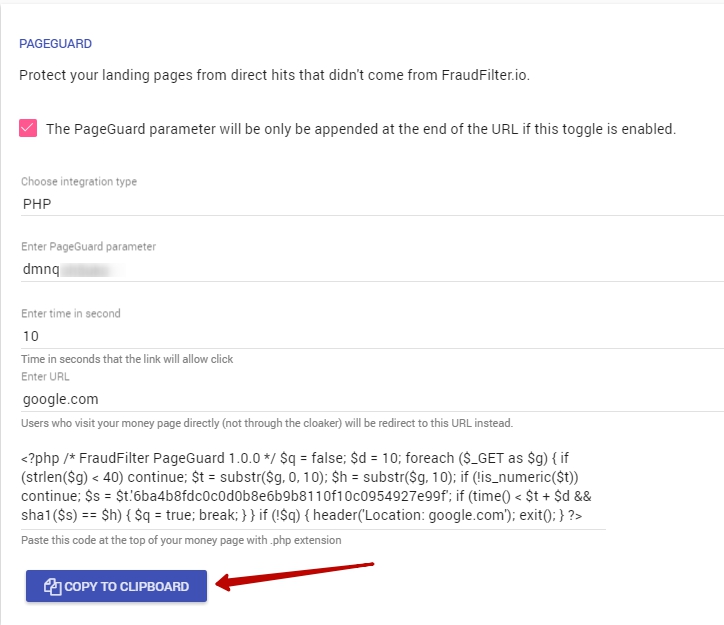
It's available on the Integration page below JavaScript / PHP code.
Simply scroll down on the integration page and you'll find it here:
Configuration
Time in seconds
Your money page will only be accessible to a visitor after a redirect from cloaked URL to your money page URL for the time (in seconds) you set here.
It might help in cases where competitors (spy) can bookmark your URL after clicking through your funnel like a legit visitor.
After implementing PageGuard, URL of your money page expires after X seconds.
So, you need to ask yourself, “For how long do I want this URL to be accessible to my visitor?”
If you are trying to hide your money page from affiliate networks or advertisers then I suggest setting it to something small like 5 seconds.
If you want to visitors to be able to bookmark your money page URL and revisit later after an hour (3600 seconds) or a day then it must be set higher than an hour or a day (86400 seconds) respectively.
URL
The visitors who did not come from the cloaked URL (came directly) or who came after the set timeout will be sent to this URL.
If you don't specify any URL here then it will return 404 HTTP status code.
URL Parameter
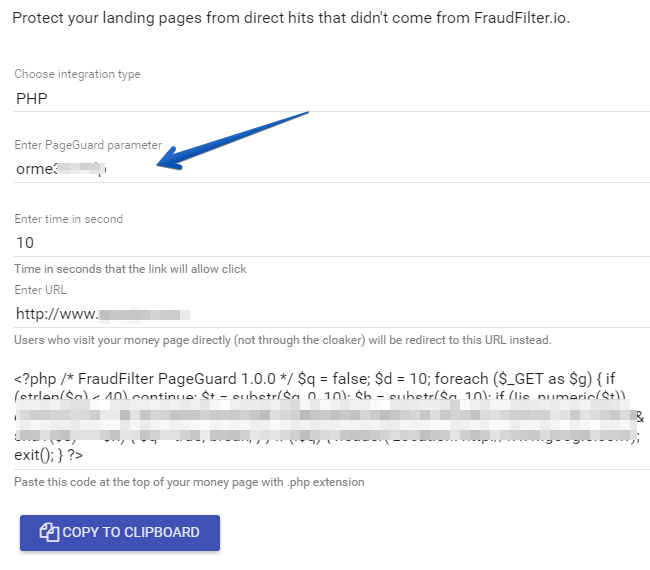
We append a secret parameter (differs per campaign) at the end of the money page URL for PageGuard.
If you are using Voluum or any other tracker then you need to configure it to pass through this parameter to your money page as is.
Implementation
Copy and paste the PHP code on top of your money page, above everything else, strictly at the start of the money page file.
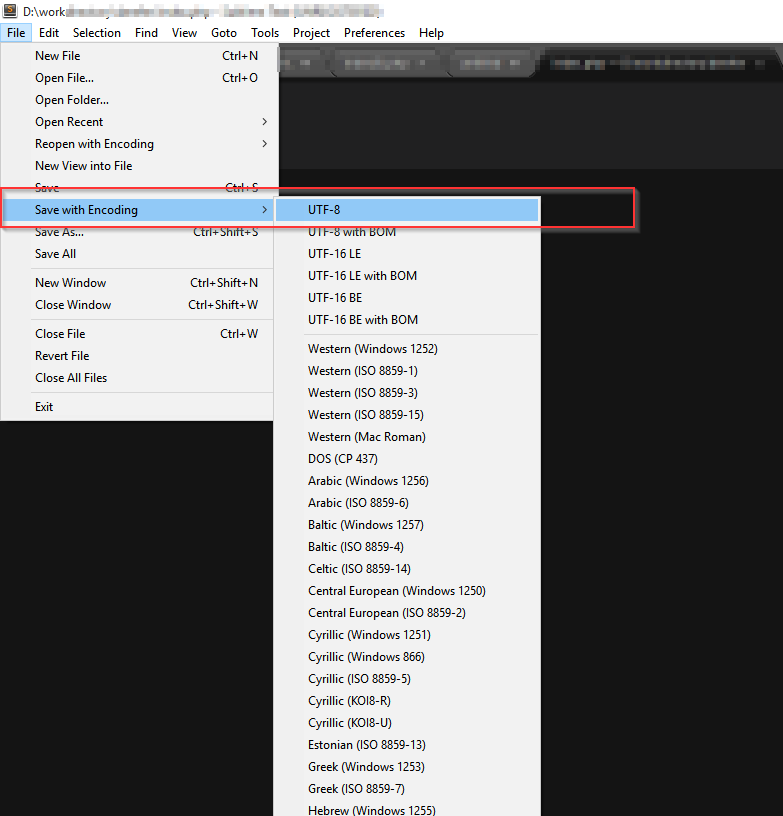
Save the file with UTF-8 encoding making sure that there is no whitespace at the start of the file (Sublime text 3 editor in the screenshot):
Important
If your money page is hosted on CDN then you can only use JavaScript code.
If your money page is hosted on a webserver / hosting provider then you can use either PHP paste or JS code.
We recommend using PHP code whenever it's possible. But if your money page is hosted on a CDN like Amazon S3 then it might not be possible in which case you can use JS code. The PHP code is executed serverside and JS on the client side. The code on the server side is usually a lot more secure and tamper proof.
Multiple PageGuard
You can only use 1 PageGuard per money page per campaign. If you paste multiple PageGuard from multiple campaigns into 1 money page, it will simply not work.
The workaround is to duplicate the money page into separate folders then paste your unique code on top of them.
Tracker
Note:You only have to implement the method below if your tracker is placed after the cloaked URL. If the tracking URL is before the cloaked URL, then you do not have to follow this.
Using PageGuard with a tracker is tricky as you need to pass the PageGuard parameter from cloaked URL to tracker to the money page.
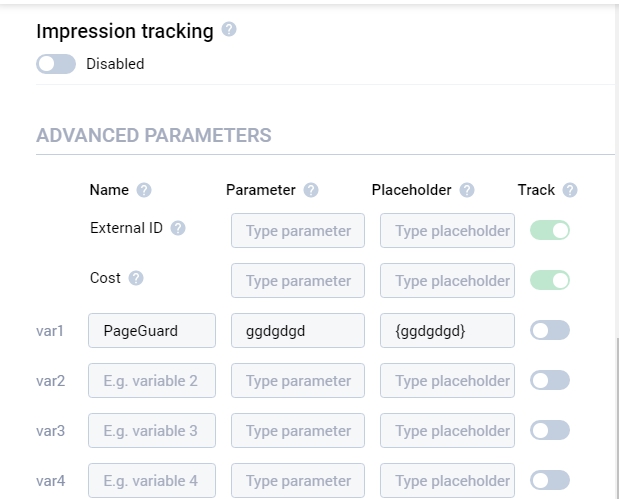
Assuming your parameter name is "ggdgdgd", you'll use this configuration in your tracker's traffic source tracking token template. Below is the screenshot from Voluum:
Finally, pass it to your money page URL:
You don't have to do this again. You can simply use the same parameter for all campaigns in FraudFilter or you can use a unique parameter per traffic source.
Warning
Note that changing any of the PageGuard options updates the code that you need to place on your target landing pages.
Also note that it is not wise to redirect users back to your fraudfilter campaign, as this will cause a redirect loop. Direct visitors to a safe page that does not use fraudfilter code.
PHP filepath Include
If you are using PHP filepath include for the money page then PageGuard is neighter supported, nor needed.
When using PHP filepath include, no one knows about the filepath path you’ve included, so it’s not possible to access it directly without going through the page where the filtering code resides, which defeats the purpose of using PageGuard.